Supplier payments for business

Pay suppliers with USDT. They receive fiat.

See the service fee before you confirm and the payment status after you send.

Supplier paid in 1–2 business days · Documents checked same day · Up to 100,000 USDT per order

How it works

From invoice to supplier payment.

01
Start in Telegram.
Submit company documents and the supplier invoice for review. Complete documents are checked the same day.
02
Review your quote.
Check the rate, service fee and supplier amount, then confirm and fund the payment in USDT.
03
Your supplier receives fiat.
After approval and funding, our payout partners arrange supplier payment in 1–2 business days.

Pay an invoice

Have a supplier invoice?

Request a quote in Telegram. Review the exchange rate, fees and supplier payout before you confirm.

Pay an invoice
Pricing

Know the terms before you confirm.

Service fees are separate from network costs. Fiat payout rates and fees appear in the quote.
Send
Shown before you send
Check the service fee and network costs for your selected wallet before you confirm.
Fiat payout
Rate at request
Rate and fee appear in the quote. A request requires an enabled corridor, an admitted wallet and applicable limits.
Invoice payments: up to 100,000 USDT per order · up to 200,000 USDT daily per client. Available routes and wallet conditions are checked before a quote.
What’s inside

One wallet for the whole payment cycle.

RU/EN screenshots use synthetic data; ES displays EN frames.
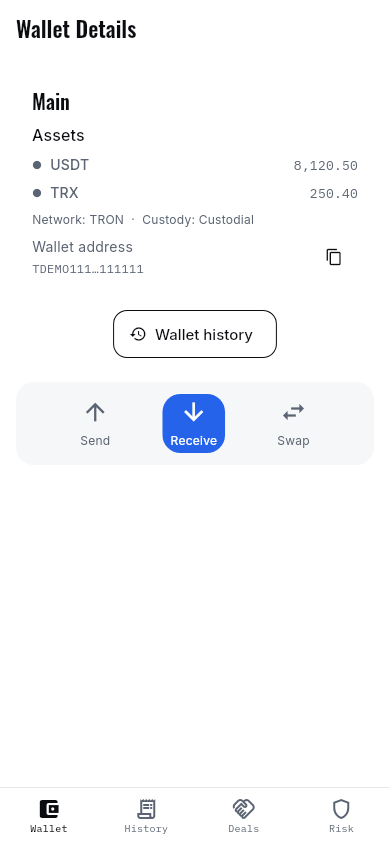
Asset list and total balance
Wallets
TRON, Base and Ethereum in one interface. Balance and address for each network, in plain view.
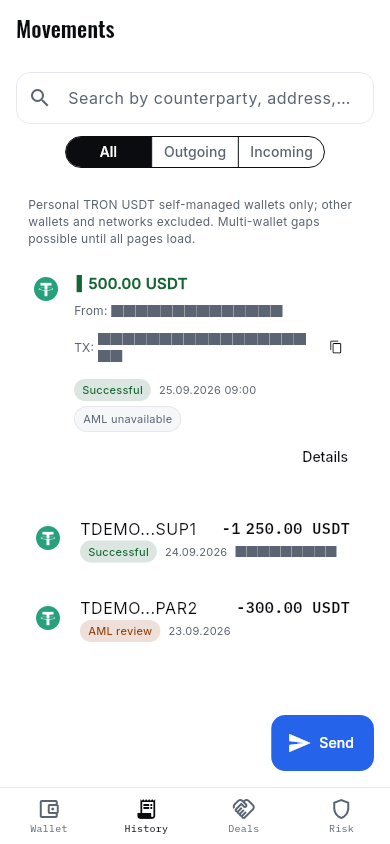
Daily transfer history
History & statements
A full movement feed and a period statement — for bookkeeping and reconciliation.
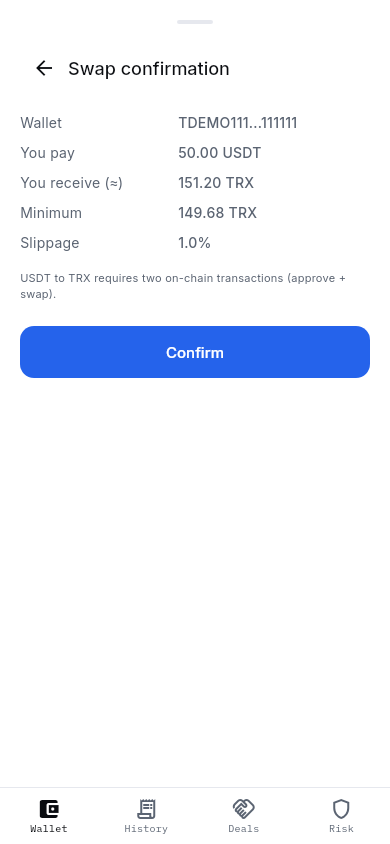
USDT to TRX swap confirmation in the mobile app
Exchange
USDT–TRX swaps on TRON are available for supported self-managed wallets; the quote is shown before confirmation.
Send with confirmation
Address, amount and fee are visible before you confirm. The transfer is signed manually.
Incoming status
History shows each incoming transfer and the available AML status; an unknown result is not shown as clean.
Counterparties
Supplier and partner addresses are saved — pay by name, not by address.

Download for Android

Security

Control at every important step.

TOTP / 2FA

Authenticator codes add a second factor to supported sign-in and payment flows.

Confirm money actions

Sensitive fiat actions require a recent password or TOTP confirmation (money-sudo).

Organization roles & approvals

Owner, admin, approver and viewer roles separate access. Supported merchant payouts have an approval step.

Audit trail

Payment authorizations and risk decisions are recorded for review and reconciliation.

Incoming-funds checks

Supported deposits pass through KYT risk checks and review states. An unavailable result is not a clean verdict.

Saved recipients

Store supplier details and recipient addresses in your address book.

KMS-backed key storage

Custodial wallet key material is encrypted through KMS rather than stored as plain text.

Self-managed option

Choose a supported self-managed wallet with its recovery setup. Available controls depend on wallet type and network.

FAQ

Questions before you connect.

Who can sign up?
Companies and sole proprietors that pass KYB (business and beneficial-owner identification). Apply through Telegram.
What are the limits?
Invoice payments: up to 100,000 USDT per order and 200,000 USDT per client per day. Availability remains subject to route and document review; wallet transfer limits depend on your account.
A transfer is stuck — what do I do?
Message support with the transfer number. We will check the network status and any available screening information during business hours.
Self-managed or custodial?
A self-managed wallet shows on-chain funds; a custodial wallet shows the platform balance. The service processes keys in both modes; we explain signing and recovery before onboarding.
Support
Telegram, we reply during business hours (Europe/Moscow).

Contact support in Telegram

Which wallets and networks are available?
Availability depends on the network, wallet type and interface. Fiat payouts require an admitted personal custodial TRON/USDT wallet and an enabled corridor; the quote states the applicable terms.
How long does a supplier payment take?
Documents are checked the same day once complete. Supplier payment takes 1–2 business days after approval and funding. Additional checks and bank holidays can affect timing.
What documents are needed for an invoice?
Stage 1 KYB: company registration, directors/shareholders extract, tax number, director’s passport and a short business description. For each payment: the supplier invoice or contract and recipient details. Russia is not a served market.

Guides

All guides

Get started

Ready to pay your supplier?

Start through Telegram. KYB verification is required before access.

Open bot Pay an invoice
Fees · Access and limits · A2 Route screening service